Sugar for Syspro User Guide
Overview
The Sugar for Syspro integration streamlines the sales process by synchronizing customer, product, sales and financial data between Sugar and Syspro. Sugar unifies product, customer, order, and service data to guide sales reps toward the right actions to win business, strengthen customer loyalty, and drive repeat sales and long-term account growth. In this integration, Syspro serves as the system of record for ERP-driven data such as products, sales orders, and invoices, while Sugar acts as the system of engagement for sales activities, quoting, and customer visibility. This guide covers the basics of how the Sugar for Syspro Standard Solution works and outlines the key processes users will follow to sync records between the systems. For information on enabling the integration, refer to the Sugar for Syspro Administration Guide.
Note: Your instance must be on Sugar Sell 25.1.0 or higher for the integration to work between Sugar and Syspro.
Using Sugar for Syspro
The following sections cover how sales reps can manage customers, opportunities, quotes, and sales orders in Sugar to sync to Syspro. Please note that there are various methods for creating records in Sugar including basic creation, quick create, duplication, and import. For more information on creating records in Sugar, refer to the User Interface documentation in the Sugar Application Guide.
Managing Accounts
Sales reps can either create new prospects or update existing ones in Sugar's Accounts module. If your organization uses the Leads module to track prospects in Sugar, then once the lead has been evaluated and qualified, you can convert the lead into an account with the account type set to "Prospect". Please note that prospect accounts do not sync to Syspro. Only valid customers (e.g., account type is "Customer (Syspro)") are synced to Syspro once certain required Syspro fields are completed on the record view. The sections below cover how to create and manage prospect accounts in Sugar and how to turn them into customers to sync to Syspro.
Creating an Account
Use the following steps to create a new prospect account:
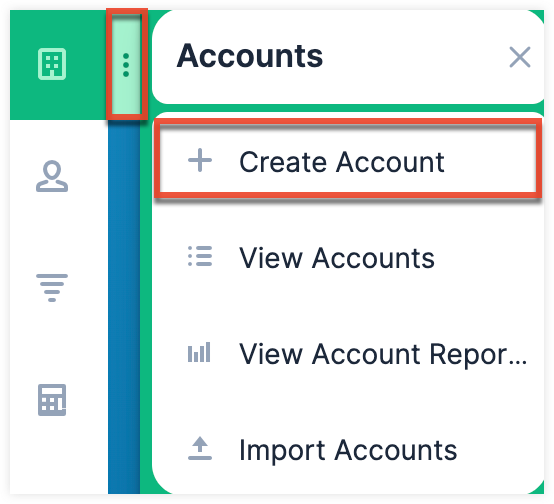
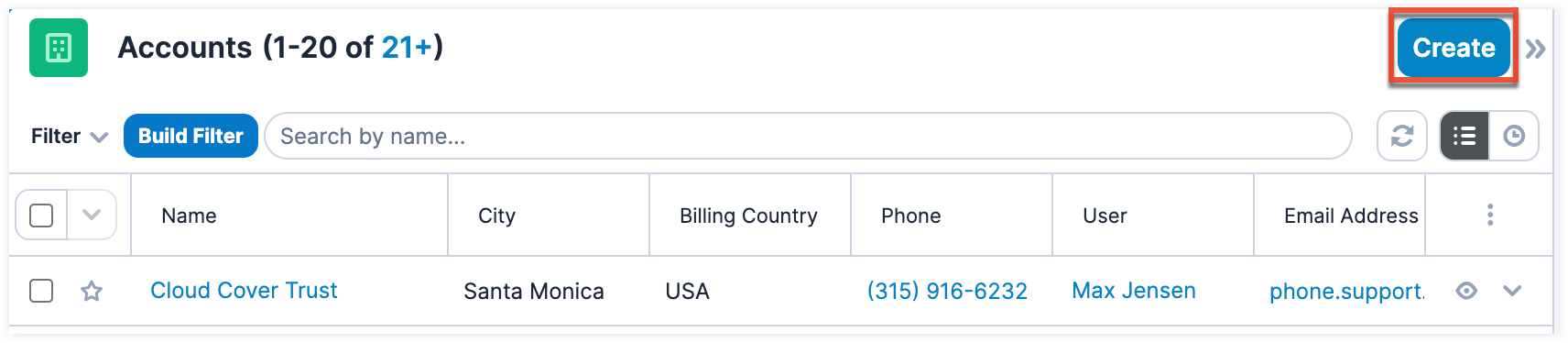
- Click the three-dots menu in the Accounts module tab to open the Actions menu and select "Create Account". You can also click the Create button on the upper right of the Accounts list view.
- From Accounts module tab:
- From Accounts list view:
- From Accounts module tab:
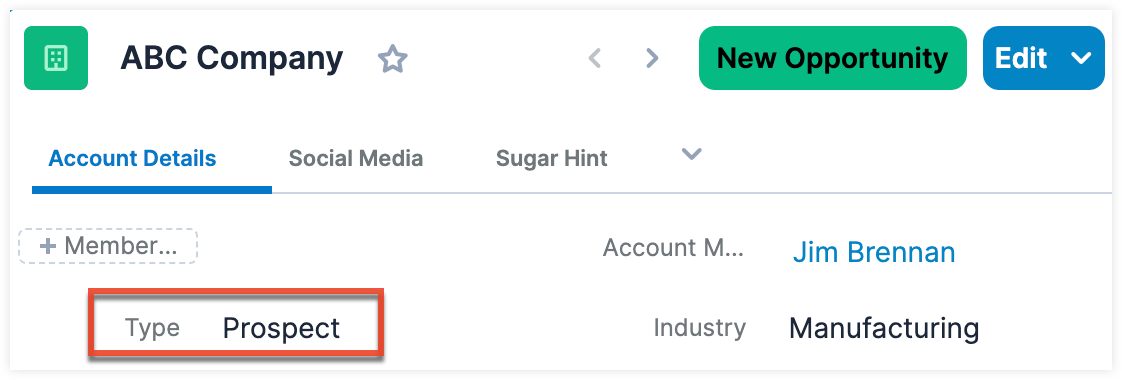
- Enter appropriate values (e.g., name, office phone, address) for the fields in the record view layout. All required fields will indicate "Required" in the field and must be completed prior to saving. Leave the account's Type field as "Prospect".
- Once the necessary information is entered, click "Save". The new account record will appear in the Accounts list view as a prospect, but will not sync to Syspro yet.
Creating an Opportunity
Once the prospect has been qualified and the sales rep determines there is a real potential to sell to them, they can create an opportunity in the Opportunities module to track the deal and manage its progress through the sales stages. For more information on creating opportunities, refer to the Managing Opportunities section below.
As the opportunity progresses through the sales stages and the prospect is ready to review pricing, the sales rep can generate a quote directly from the opportunity record. For more information on generating quotes, refer to the Managing Quotes section below.
Turning Prospects Into Customers
Once the prospect accepts the pricing and terms of the quote and agrees to proceed with the sale, they may provide a Purchase Order (PO) number to the sales rep. Now that the prospect is ready to buy, you can turn them into a customer by updating the account's Type field to "Customer (Syspro)". When this account type is selected, a number of Syspro-specific fields (e.g., Syspro AR Terms, Syspro Area, Syspro AR Branch) will appear in the Syspro Details section. The required fields must be completed before the record can be synced to and created in Syspro. Once the account is created in Syspro, the customer's account number will be generated by Syspro and synced to the Syspro Account Number field on Sugar's account record.
Note: If you wish to sync the record as a supplier to Syspro and manage this supplier in Sugar, you can set the account type to "Supplier (Syspro)".
Syspro Fields
The following Syspro fields appear in the account's record view. All required fields will indicate "Required" in the field and must be completed prior to saving the record. For a complete list of other stock fields that come out-of-the-box with Sugar for the Accounts module, refer to the Accounts documentation in the Sugar Application Guide.
The following fields appear when "Customer (Syspro)" is selected as the account type:
| Field | Description |
| Syspro Account Number | The unique account number generated in Syspro and synced to Sugar to indicate that the customer record exists in Syspro. |
| Syspro AR Terms | SYSPRO Accounts Receivable (AR) Terms define the credit, payment, and discount structure assigned to customers to determine when an invoice is due and if a settlement discount applies. |
| Syspro AR Terms (Text) | The AR terms value synced from the customer record in Syspro. This is a read-only field. |
| Syspro Area | User-defined locations (e.g., regions, territories) for reporting, customer analysis, and logistics within the system. |
| Syspro Area (Text) | The Syspro Area value synced from the customer record in Syspro. This is a read-only field. |
| Syspro AR Branch | A structural entity used to categorize customers for regional reporting, financial analysis, and General Ledger (GL) integration. |
| Syspro Branch (Text) | The branch value synced from the customer record in Syspro. This is a read-only field. |
| Syspro Customer Class (AR) | An Accounts Receivable (AR) tool used to categorize customers for reporting, analysis, and management. |
| Syspro Customer Class (Text) (AR) | The customer class value synced from the customer record in Syspro. This is a read-only field. |
| Syspro Currency | The specific monetary unit assigned to a customer in their record, representing their local currency. |
| Syspro Currency (Text) | The currency value synced from the customer record in Syspro. This is a read-only field. |
| Syspro Current Year Sale | The annual sales value of a stock item. |
| Syspro Date Last Pay | The date on which a payment was last processed for a specific entity (e.g., customer) in Syspro. This is a read-only field. |
| Syspro Date Last Sale | The date on which an item was last sold in Syspro. This is a read-only field. |
| Syspro Office Phone Extension (Text) | The customer's office phone extension synced from Syspro. This is a read-only field. |
| Syspro Prior Year Sale | The sales data (e.g., quantities, values, history) from the previous financial year, calculated relative to the current account period in Syspro. This is a read-only field. |
| Syspro Salesperson | The Syspro salesperson assigned to the customer. |
| Syspro Salesperson (Text) | The Syspro salesperson value synced from the customer record in Syspro. This is a read-only field. |
| Syspro Sync Message (Text) | Read-only message indicating the current synchronization status between Syspro and Sugar. |
The following fields appear when "Supplier (Syspro)" is selected as the account type:
| Field | Description |
| Syspro Account Number | The unique account number generated in Syspro and synced to Sugar to indicate that the customer record exists in Syspro. |
| Syspro AP Branch | The AP branch to categorize, manage, and report on supplier activities by specific locations, departments, or business units. |
| Syspro AP Terms | The specific payment agreements with suppliers, determining when supplier invoices are due (e.g., net days, days after month-end) and calculating any applicable early payment discounts |
| Syspro AP Terms (Text) | The AP terms value synced from the supplier record in Syspro. This is a read-only field. |
| Syspro Area | The area used to capture and maintain specific, user-defined locations (e.g., regions, territories) for reporting, customer analysis, and logistics within the system. |
| Syspro Area (Text) | The area value synced from the supplier record in Syspro. This is a read-only field. |
| Syspro Branch (Text) | The branch value synced from the supplier record in Syspro. This is a read-only field. |
| Syspro Currency | The specific monetary unit assigned to a supplier in their record, representing their local currency. |
| Syspro Currency (Text) | The currency value synced from the supplier record in Syspro. This is a read-only field. |
| Syspro Office Phone Extension (Text) | The supplier's office phone extension synced from Syspro. This is a read-only field. |
| Syspro Supplier Class | A classification code used to group suppliers with similar characteristics (e.g., raw material vendors, service providers, foreign suppliers) for reporting, analysis, and default setting purposes in the Accounts Payable module. |
| Syspro Supplier Class (Text) | The supplier class value synced from the supplier record in Syspro. This is a read-only field. |
| Syspro Sync Message (Text) | Read-only message indicating the current synchronization status between Syspro and Sugar. |
Managing Opportunities
Opportunities in Sugar represent potential sales, and the Opportunities module allows sales reps to track deals from start to finish. When revenue line items are enabled, the key sales data is stored in the opportunity record along with its related revenue line item records.
Once the prospect has been qualified and the sales rep determines there is a real potential to sell, they can create an opportunity as follows:
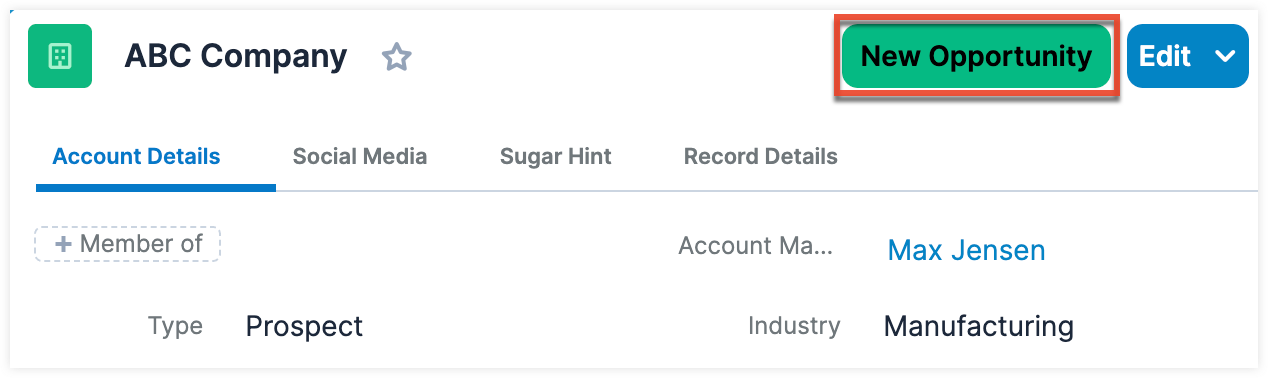
- In the account record (e.g., ABC Company), click the New Opportunity button on the upper right.
- Enter appropriate values for the fields in the record view layout. All required fields will indicate "Required" in the field and must be completed prior to saving.
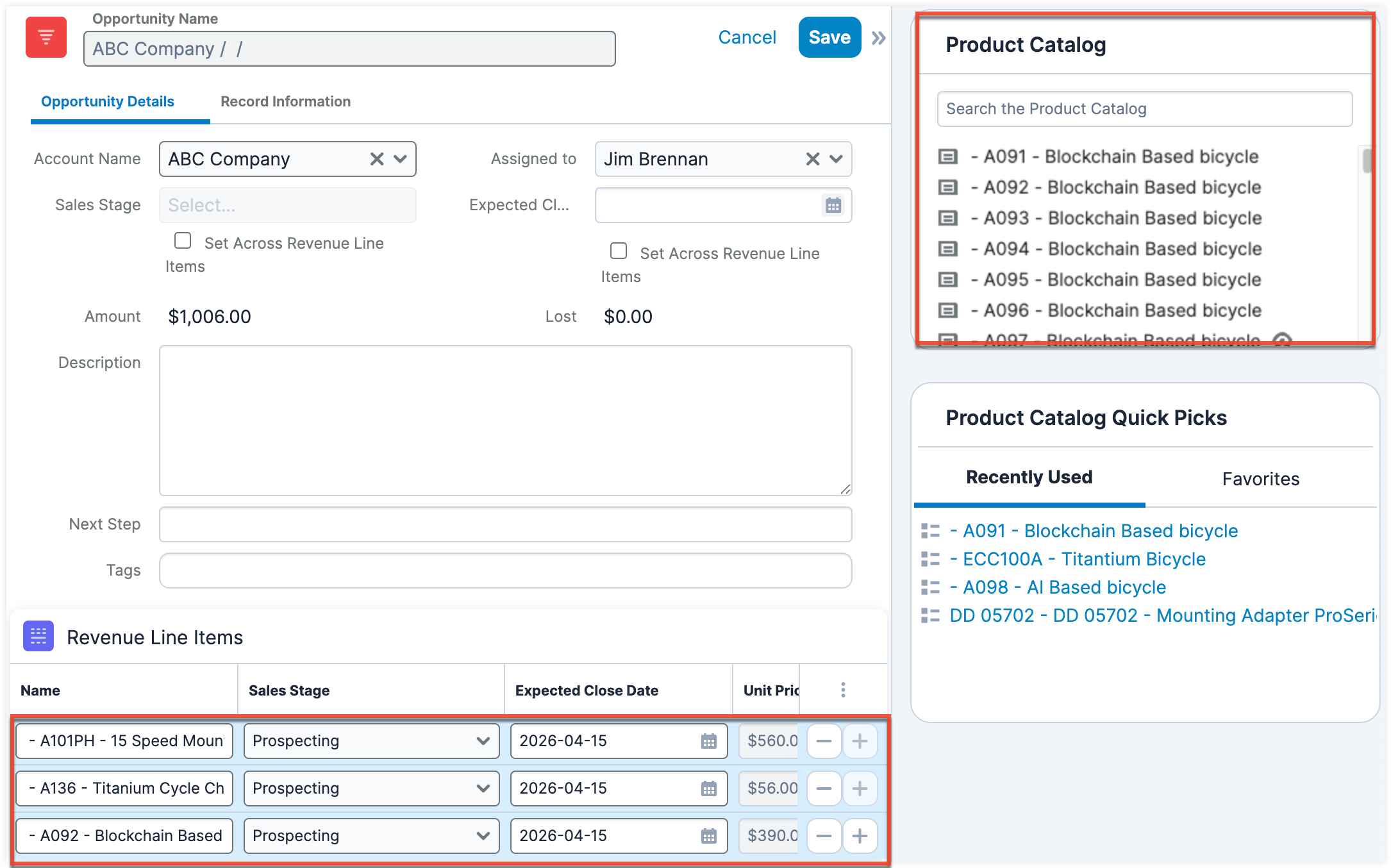
- Create at least one revenue line item in the Revenue Line Items subpanel that appears beneath the opportunity fields. The related revenue line item(s) in the subpanel determine the value for certain Opportunity fields (e.g., Sales Stage, Expected Close Date).
- You can easily find and select products from your Syspro product catalog, which is synced to Sugar, by using the Product Catalog dashlet located next to the opportunity record. For more information on creating revenue line items via the Product Catalog dashlet, refer to the Opportunities With Revenue Line Items documentation in the Sugar Application Guide.
- Once the necessary information is entered, click "Save".
Managing Quotes
As the opportunity progresses through the sales stages and the prospect is ready to review the pricing, the sales rep can generate a quote directly from the opportunity's revenue line items using the following steps:
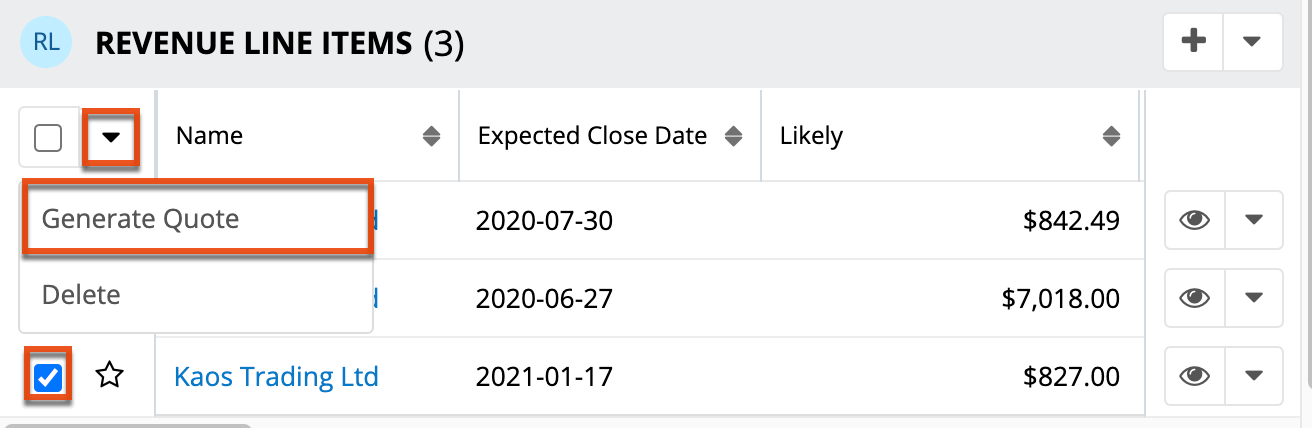
- In the opportunity record view, scroll to the Revenue Line Items subpanel below the opportunity's fields.
- Select the checkboxes of the revenue line items you would like to include in the quote.
- Choose "Generate Quote" from the Actions menu.
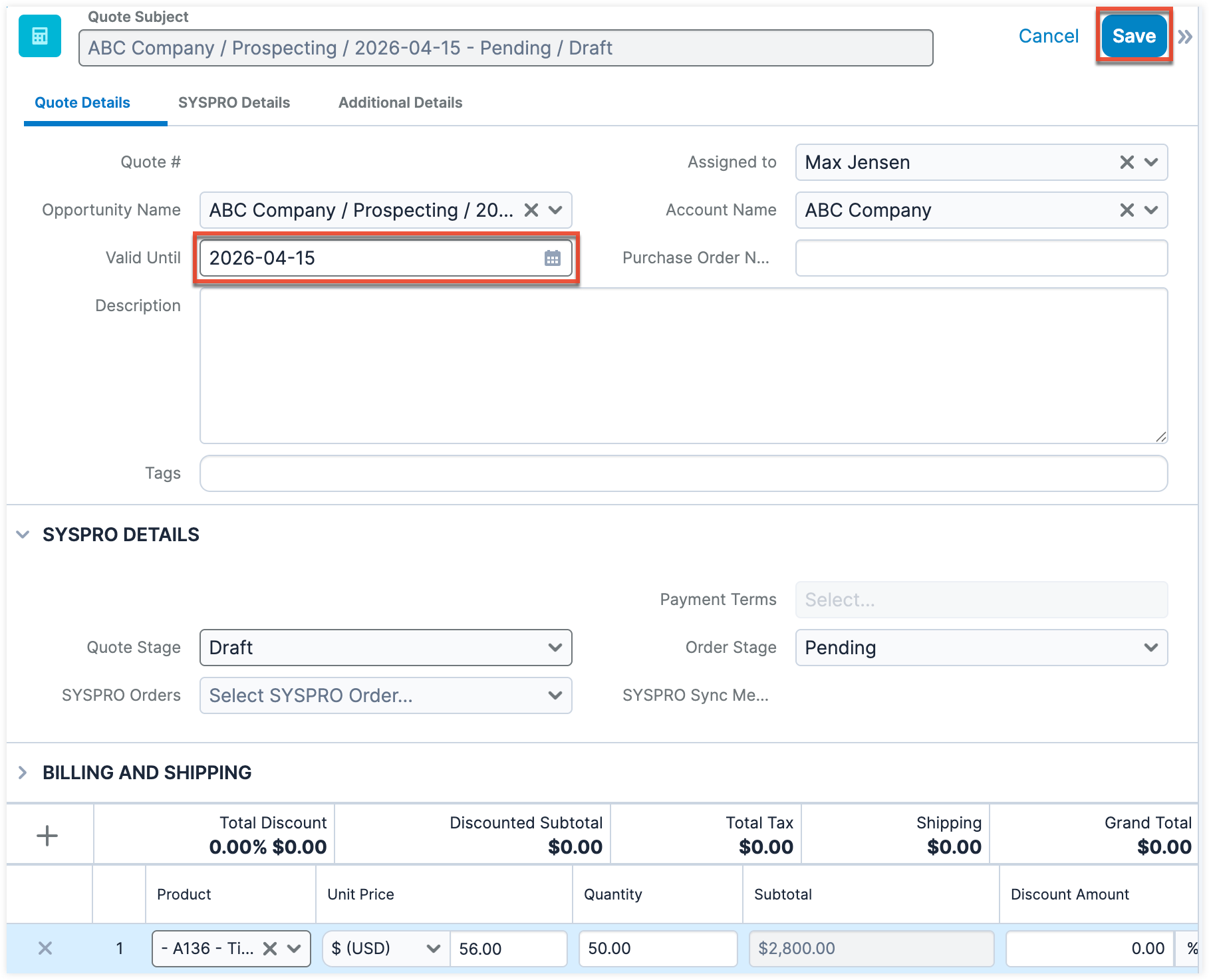
- The quote record that opens in edit view will have all relevant fields and line items automatically populated from the revenue line item records. Make any necessary modifications including the Valid Until date, then click "Save" to preserve your changes.
Once the quote is generated, the sales rep can then review and negotiate the proposal with the prospect. You also have the option to generate a professional-quality document from either the opportunity or the quote record that provides detailed pricing and product information to send to the prospect.
Once the prospect accepts the quote and agrees to proceed with the sale, navigate back to the account (e.g., ABC Company) in Sugar to turn them into a customer. Once the record is created in Syspro, Syspro generates an account number, which is then synced back to Sugar. The Syspro Account Number field on the Sugar account record is automatically updated to indicate that the customer now exists in Syspro.
If the customer provides a Purchase Order number, you can enter it in the quote record once the customer record exists in Syspro. The quote can now be synced to Syspro by clicking the Sync to Syspro button, which only appears if the related account to the quote has already been turned into a Syspro customer and the account record exists in Syspro.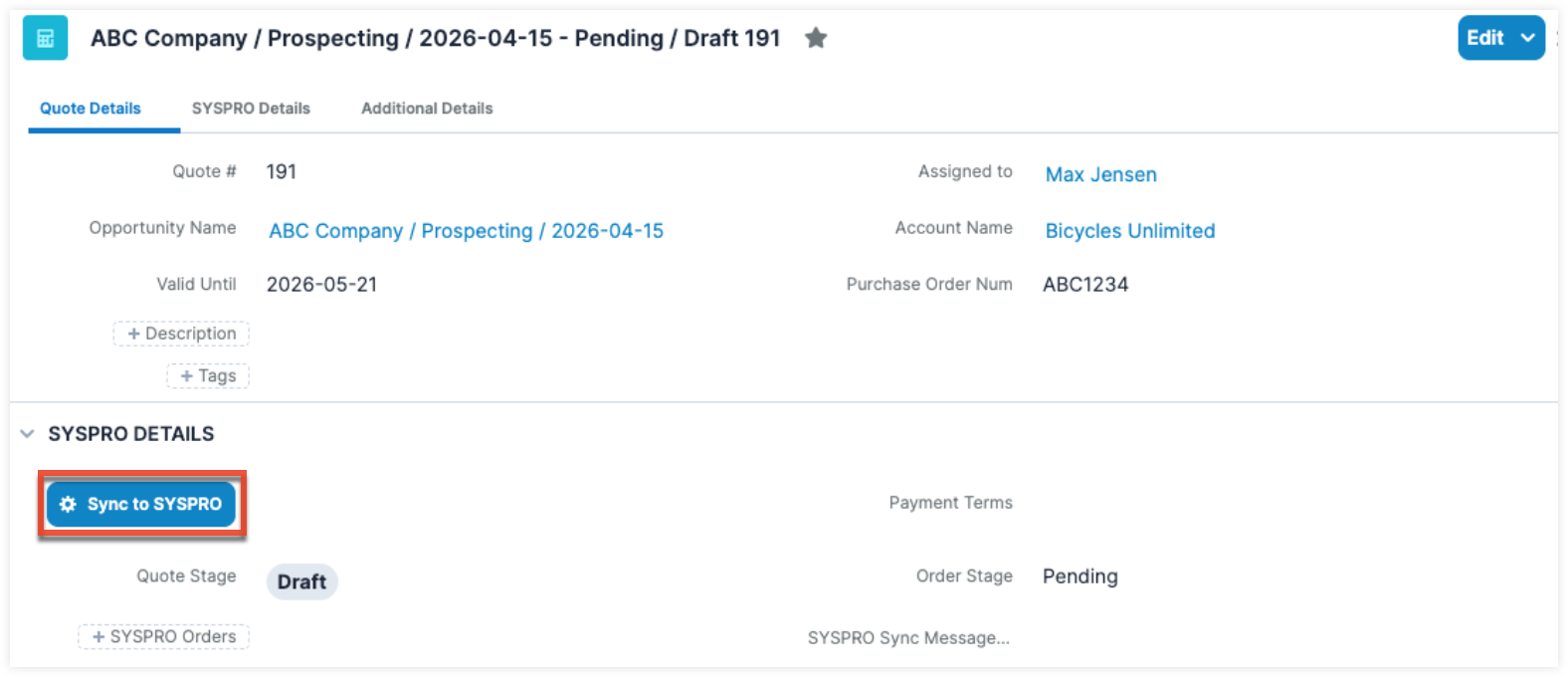
Once the Sync to Syspro button is clicked, it triggers the following actions in Sugar:
- The current quote's stage changes to "Closed Accepted" if the quote is synced successfully to Syspro, and the order stage is set to "Confirmed" as shown below.
- All other quotes related to the same opportunity are marked "Closed Dead", and the order status is set to "Canceled".
- The related opportunity's sales stage is updated to "Ready for Syspro", indicating that it is ready to be processed by Syspro Connect in the next integration cycle.
Once the quote has been successfully created in Syspro, Syspro will generate the sales order, and the Syspro order number will automatically sync to the Syspro Orders field on the Sugar quote.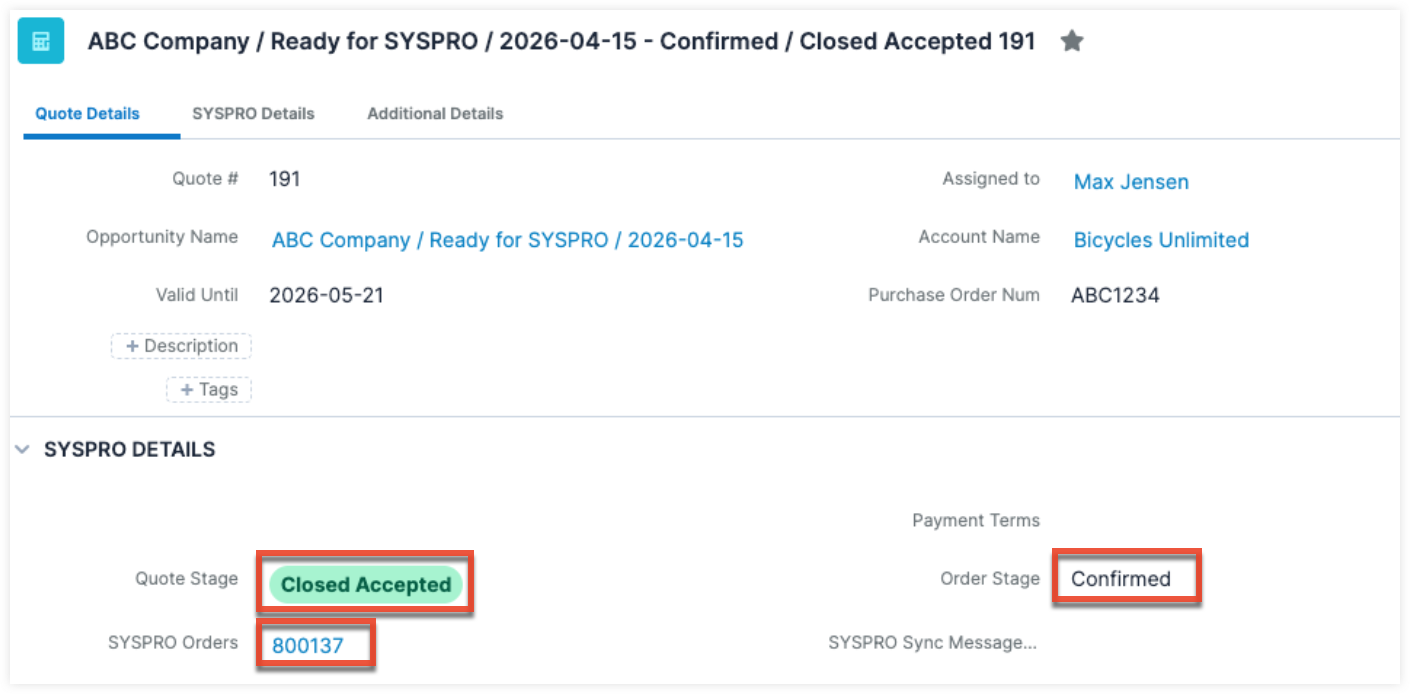
Troubleshooting Quote Sync Issues
If the quote fails to sync in Syspro due to issues such as pricing mismatches or unavailable products in Syspro, the quote's stage will be set to "Closed Lost" and the related opportunity's sales stage will be set to "Canceled in Syspro". You can review the message in the Syspro Sync Message field on the quote record to understand why the sync failed and correct the issue before generating a new quote. Once you have resolved the issue, follow the above steps again to generate a new quote to sync to Syspro.
Tracking Sales Orders
When the accepted quote is successfully synced to Syspro, Syspro creates the official sales order and then syncs it back to the Syspro Orders module in Sugar. The sync also automatically updates the Syspro Orders field in the quote record with the Syspro order number. You can access the sales order by clicking the sales order number on the quote or by locating the record directly in the Syspro Orders module.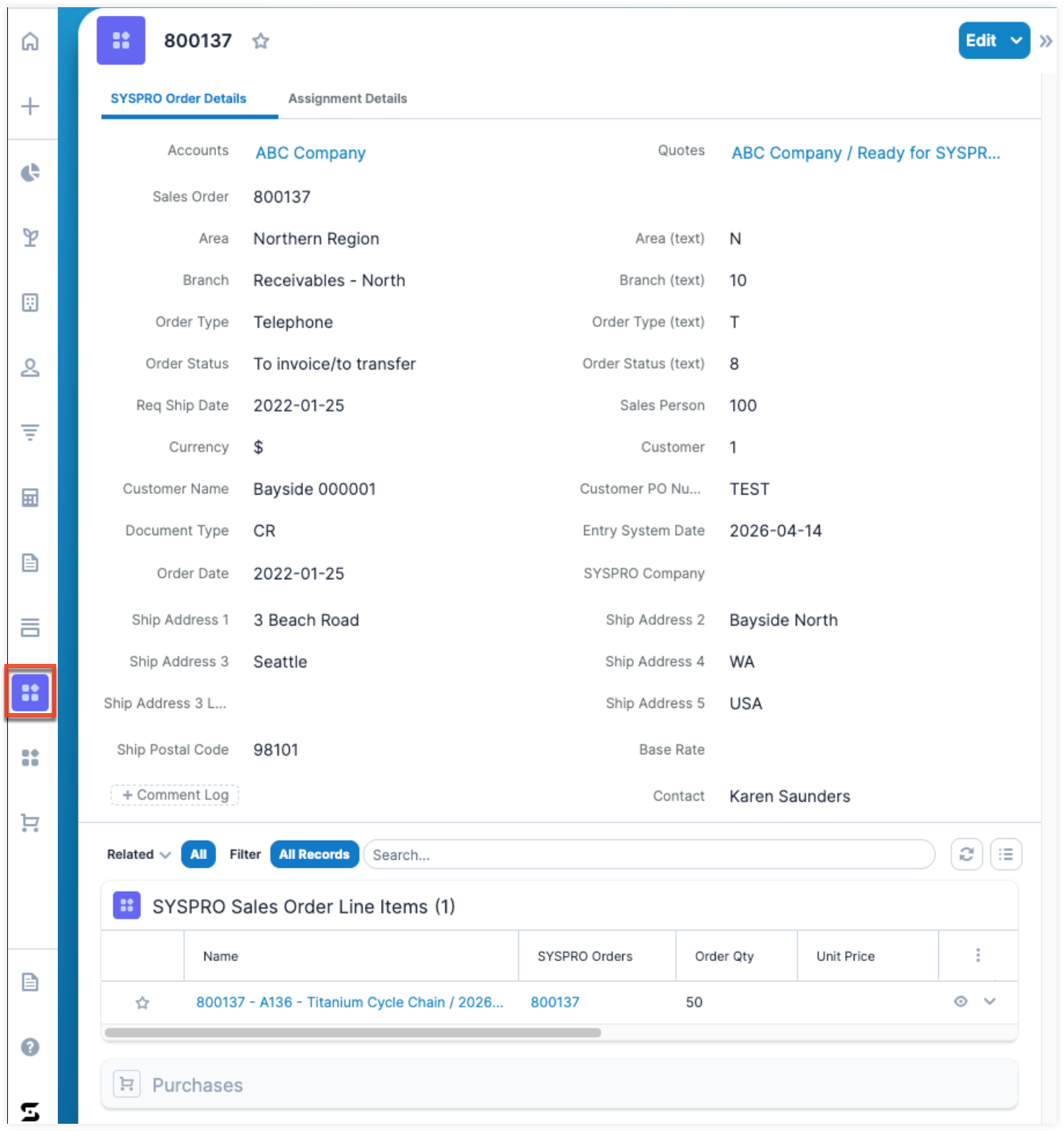
Once the sales order is created in Syspro, it enters Syspro's full fulfillment workflow, which may include activities such as inventory allocation, pricing and discount validation, and shipping operations. As the sales order progresses through its lifecycle in Syspro, Syspro Connect monitors status changes and pushes updates back to Sugar. This allows the sales rep to track the order fulfillment directly within Sugar without accessing Syspro.
For each sales order update from Syspro, Syspro Connect determines the appropriate action in Sugar based on the following order status:
| Sales Order Status | State | Updates in Sugar |
| Canceled/Rejected | Final state (no further changes) |
|
| Completed/Done | Final state (no further changes) |
|
| Other (informational statuses) | Intermediate state (can change to other statuses) |
|
Once the sales order reaches the Completed status, it indicates that the order has been fulfilled, the customer has been invoiced, and the sales cycle has successfully concluded. At this stage, Syspro Connect extracts all invoices related to the completed sales orders and creates the corresponding Purchase and Purchased Line Item records in Sugar.
Syspro Orders Fields
The table below outlines the available fields in the Syspro Orders module and their definitions. Administrators or users with developer-level role access have the ability to alter, add, or remove fields via Admin > Studio. For more information on configuring fields, refer to the Studio documentation in the Sugar Administration Guide.
| Field | Description |
| Accounts | The account to which the sales order belongs. |
| Area | User-defined locations (e.g., regions, territories) for reporting, customer analysis, and logistics within the system. |
| Area (text) | User-defined locations (e.g., regions, territories) for reporting, customer analysis, and logistics synced from Syspro. This is a read-only field. |
| Assigned to | The Sugar user (sales rep) assigned to the sales order. |
| Base Rate | The standard or default rate used as the starting point for calculations, pricing, billing, commissions, currency conversions, or service charges before any adjustments, discounts, premiums, or custom rates are applied. |
| Branch | The specific location, office, or business unit responsible for managing customers, contacts, sales activities, or services. |
| Branch (Text) | The specific location, office, or business unit responsible for managing customers, contacts, sales activities, or services. This value syncs from Syspro and is a read-only field. |
| Comment Log | A shared log of messages, comments, or other text, including the name of the user that added the log entry and the date and time it was added. It is possible to tag other users and link to other Sugar records in Comment Log entries by inserting a clickable pill. Refer to the User Interface documentation in the Sugar Application Guide for more details. |
| Contact | An individual person associated with an organization, customer, prospect, or business relationship that your company interacts with. |
| Currency | The denomination (e.g., USD, EUR, GBP, INR) in which amounts, prices, revenues, and costs are recorded and reported. |
| Customer | The unique identifier for the customer in Syspro. |
| Customer Name | The name of the customer receiving the product or service. |
| Customer PO Number | The unique reference number assigned by the customer to a purchase order. It is used to track, authorize, and reconcile purchases between the customer and supplier. |
| Date Created | The date the sales order record was created. |
| Date Modified | The date the sales order record was last modified. |
| Description | A description or other information about the sales order. |
| Document Type | Classification that identifies the kind of business document being created, stored, or processed in the system. |
| Entry System Date | The date and time when the record was first created or entered into the system. |
| Integration Sync ID | A unique identifier used to synchronize and track records between Sugar and Syspro. |
| Invoice Number | A unique number assigned to an invoice for tracking, billing, and accounting purposes. |
| Order Date | The date on which the customer order was created or placed. |
| Order Status | Display value for the current processing stage of the order, typically stored as a system value or code (e.g., Pending, Approved, Shipped). |
| Order Status (Text) | The system value for the current processing stage of the order, typically stored as a system value or code (e.g., Pending, Approved, Shipped). This value syncs from Syspro and is a read-only field. |
| Order Type | The display value of a system-defined category or code that identifies the type of order (e.g., Standard Order, Return Order, Rush Order). |
| Order Type (Text) | The system value of a system-defined category or code that identifies the type of order (e.g., Standard Order, Return Order, Rush Order). This value syncs from Syspro and is a read-only field. |
| Quotes | References or links to quotation records associated with the order, showing the proposed pricing and terms prior to order confirmation. |
| Req Ship Date | The date requested by the customer for the order to be shipped. |
| Sales Order | The record that confirms a customer's purchase, including products, quantities, pricing, and delivery details. |
| Sales Person | The employee or sales representative responsible for managing the customer relationship, quote, or sales order. |
| Ship Address 1 | The street address of the customer where the product or service will be shipped. |
| Ship Address 2 | Additional shipping address of the customer receiving the product or service. |
| Ship Address 3 | The city for the customer's shipping address. |
| Ship Address 3 Loc | Additional address details (e.g., town) associated with the customer's shipping address. |
| Ship Address 4 | The state for the customer's shipping address. |
| Ship Address 5 | The country for the customer's shipping address. |
| Ship Postal Code | The postal code for the customer's shipping address. |
| Syspro Company | The identifier or code representing a specific company, business entity, or operating division within Syspro. |
| Teams | The Sugar team(s) assigned to the sales order record. |
| Total | The final summed amount or aggregate value calculated from one or more line items in a record. |
| Year of Sale | The calendar year in which a sale or transaction is completed or recorded. It is used for reporting, analysis, and tracking sales performance over time. |
Syspro Sales Order Line Items Fields
The table below outlines the available fields in the Syspro Sales Order Line Items module and their definitions. Administrators or users with developer-level role access have the ability to alter, add, or remove fields via Admin > Studio. For more information on configuring fields, refer to the Studio documentation in the Sugar Administration Guide.
| Field | Description |
| Accounts | The account to which the sales order line item belongs. |
| Assigned to | The Sugar user (sales rep) assigned to the sales order line item. |
| Back Order Qty | The quantity of a product that has been ordered but is currently unavailable in stock and will be fulfilled at a later date when inventory becomes available. |
| Bin | The specific storage location within a warehouse where an item is physically stored. It helps track and organize inventory. |
| Comment | Notes, remarks, or additional information related to a record, such as special instructions, clarifications, or internal communication. |
| Comment Log | A shared log of messages, comments, or other text, including the name of the user that added the log entry and the date and time it was added. It is possible to tag other users and link to other Sugar records in Comment Log entries by inserting a clickable pill. Refer to the User Interface documentation in the Sugar Application Guide for more details. |
| Contact | A person associated with a customer, vendor, or organization in the system. |
| Conv Fact Ord UM (Conversion Factor Order Unit of Measure) | The numeric factor used to convert quantities from one unit of measure to another in sales orders. It defines how many base units are equivalent to one order unit. |
| Date Created | The date the sales order line item record was created. |
| Date Modified | The date the sales order line item record was last modified. |
| Date Sold | The date on which a product or service was officially sold or the sales transaction was completed. It is used for reporting, revenue tracking, and sales analysis. |
| Description | A description or other information about the sales order line item. |
| Discount % | The percentage reduction applied to the original price of a product or service. It reduces the selling price based on a specified rate. |
| Disc Value | The actual monetary amount deducted from the original price as a discount. It represents the calculated value of the discount after applying the discount percentage (or fixed discount). |
| Integration Sync ID | A unique identifier used to synchronize and track records between Sugar and Syspro. |
| Invoice Number | A unique identifier assigned to an invoice used for billing, tracking, and accounting purposes. It links the sale or service to a formal payment request. |
| Item Class | A category or grouping used to classify items with similar characteristics (e.g., Raw Material, Finished Goods, Service, Consumable). It helps with reporting, pricing rules, and inventory organization. |
| Item Number | A unique code or identifier assigned to a product or service in the system. It is used to track inventory, sales, and purchasing. |
| Line Ship Date | The scheduled or actual date on which a specific line item in an order is planned to be shipped or delivered. |
| Line Item Total Value | The total monetary value of a single line item in a transaction, typically calculated as quantity × unit price minus discounts plus applicable charges. |
| Line Type | Classification that defines the nature of a line in a document, such as Product, Service, Comment, Charge, or Discount line. |
| Lot | The identifier or code representing a specific company, business entity, or operating division within Syspro. It is used to separate and manage data, transactions, and configurations for different companies within the same Syspro environment. |
| Mul Div Prc Fct (Multiply/Divide Price Factor) | A numeric value to adjust or convert the price between different units of measure by multiplying or dividing the base price, ensuring accurate unit calculations on sales order line items. This value syncs from Syspro and is a read-only field. |
| Order Qty | The quantity of items a customer has ordered in a sales transaction. |
| Order UOM | The unit in which the product is ordered (e.g., pieces, boxes, cartons, kilograms). |
| Price UOM | The unit used to define the product’s pricing. It may differ from the order UOM depending on pricing structure. |
| Product Catalog | A list of products or services offered by a company, including details such as item codes, descriptions, prices, and classifications. |
| Sales Order | A formal document or record confirming a customer’s purchase, including items, quantities, pricing, and delivery details. |
| Sales Order Line | An individual line item within a sales order representing a specific product or service with its own quantity, price, and details. |
| Serial | A unique identifier assigned to an individual product unit for tracking and traceability (commonly used for warranty, service, and inventory control). |
| Ship Qty | The quantity of goods that has been dispatched or delivered to the customer. |
| Stock Code | A unique identifier assigned to an inventory item for tracking stock levels, sales, and purchasing. |
| Syspro Company |
The identifier or code representing a specific company, business entity, or operating division within Syspro. |
|
Syspro Orders |
Orders (e.g., sales orders, purchase orders) managed within Syspro. Used to record, track, and control the full order lifecycle, from order creation through processing, fulfillment, shipment, and invoicing. |
|
Teams |
The Sugar team(s) assigned to the sales order line item record. |
| Total |
The final summed amount or aggregate value calculated from one line item in a record. |
| Unit Cost | The cost incurred to produce or purchase a single unit of a product. It typically includes manufacturing, acquisition, or procurement costs, but excludes selling price or markup. |
| Unit Price | The selling price of a single unit of a product or service charged to the customer. It is the amount used to calculate revenue before taxes and discounts. |
| Warehouse | A physical or logical storage location where inventory items are kept before being distributed, sold, or used. Used to manage stock levels, picking, packing, and shipping operations. |
Viewing Purchases and Purchased Line Items
Once a sales order is marked as completed in Syspro, Syspro Connect extracts all invoices related to the completed sales orders and automatically syncs and creates the corresponding purchases and purchased line items in Sugar. These records represent the AR invoices generated in Syspro and reflect the products the customer has purchased. The records are not tied to the active sales cycle and are maintained in Sugar for informational and reporting purposes only and cannot be edited.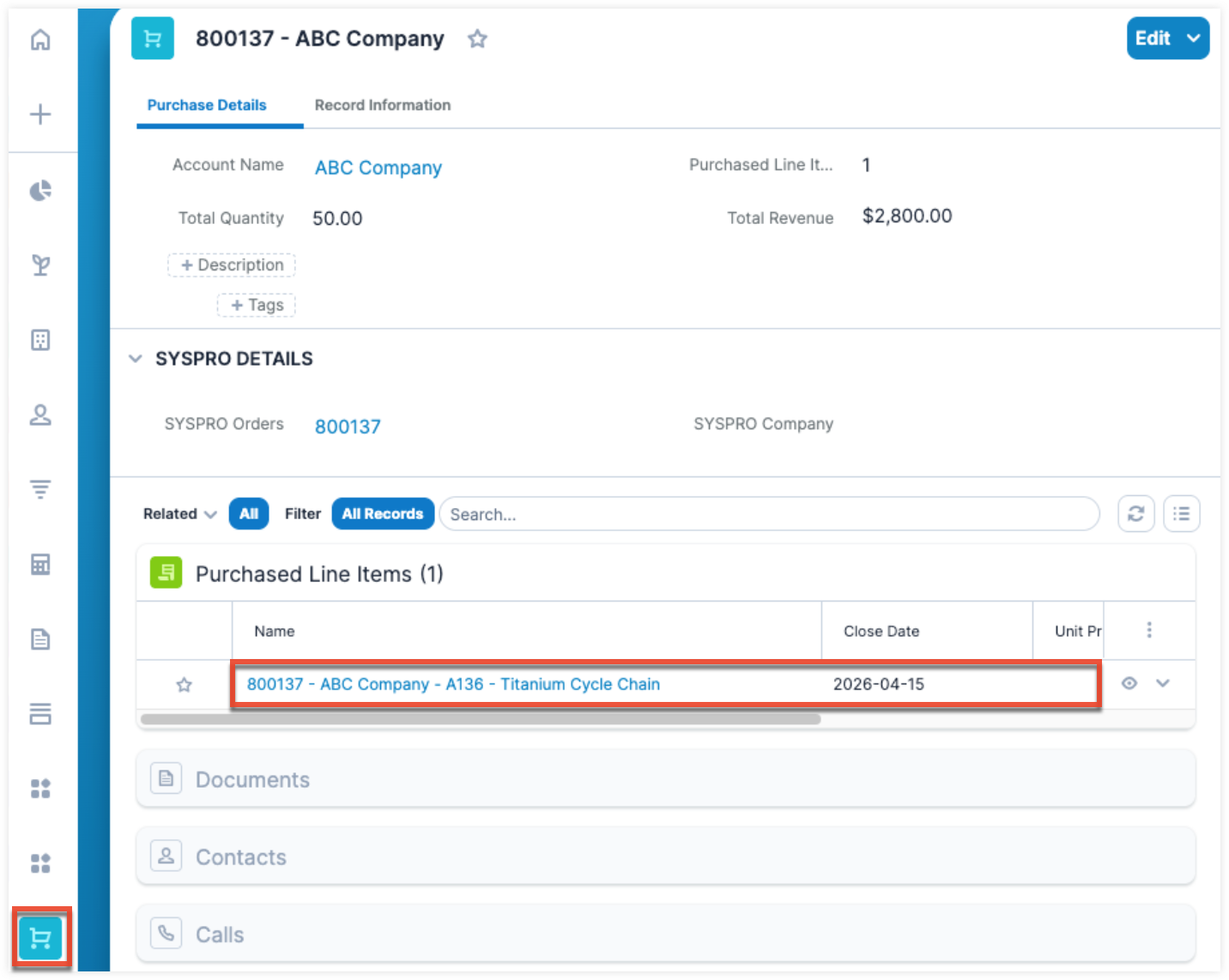
Purchases Fields
The table below outlines the available fields in the Purchases module and their definitions. These fields are read-only since they are synced from Syspro, which is the system of record. For a complete list of other stock fields that come out-of-the-box with Sugar for the Purchases module, refer to the Purchases and Purchased Line Items documentation in the Sugar Application Guide.
| Field | Description |
| Account Name | The customer or organization associated with the purchase. |
| Date Entered | The date and time when the purchase record was created in the system. |
| Description | Additional details about the purchase, such as scope, notes, or context. |
| End Date | The date when the purchase or related agreement is expected to end or be completed. |
| PLI Count | The number of product line items included in the purchase record. |
| Start Date | The date when the purchase or agreement begins or becomes effective. |
| Sync Key | A unique identifier used to synchronize the purchase record with Syspro. |
|
Total Revenue |
The total monetary value generated from the purchase, calculated from all associated line items and pricing adjustments. |
Purchased Line Items Fields
The table below outlines the available fields in the Purchased Line Items module and their definitions. These fields are read-only since they are synced from Syspro, which is the system of record. For a complete list of other stock fields that come out-of-the-box with Sugar for the Purchased Line Items module, refer to the Purchases and Purchased Line Items documentation in the Sugar Application Guide.
| Field | Description |
| Name | The label or identifier of the purchased line item, used for easy reference. |
| Cost | The purchase cost of the item per unit or total, depending on system setup. |
| Date Created | The date and time when the line item record was created in the system. |
| Product | The specific product linked to the line item, typically from the product catalog. |
| Product Category | The classification group the product belongs to (e.g., hardware, software, consumables). |
| Quantity | The number of units of the product purchased in this line item. |
| Serial Number | A unique identifier assigned to an individual product unit for tracking and traceability. |
| Syspro Invoice Number | The invoice number from Syspro associated with this purchase transaction. |
| Syspro Lot Number | The batch or lot identifier from Syspro used to track groups of products produced or received together. |
| Syspro Sales Order | The sales order reference number from Syspro linked to this line item. |
| Syspro Sales Order Line No | The specific line number within a Syspro sales order that corresponds to this purchased item. |
| Syspro Stock Code | The unique item code used in Syspro to identify and track inventory items. |
| Syspro Warehouse | The warehouse location in Syspro where the product is stored or from which it is dispatched. |
| Unit Price | The price charged for one unit of the product in the purchase transaction. |
Integration Data Flow
With the Sugar for Syspro integration, data flows bi-directionally from Syspro to Syspro Connect (Integration Platform) to Sugar.
The following table shows the data that is automatically synchronized between the systems:
| Record Type | Sugar Module | Syspro Business Object | Sync Direction | Sync Frequency |
| Customers |
Accounts |
Customers | Two-way | Near real time |
| Suppliers | Accounts | Suppliers | Two-way | Near real time |
| Contacts | Contacts | Contacts | One-way | Near real time |
| Products | Product Catalog | Stock Codes | Syspro to Sugar | Ongoing |
| Sales Orders | Sales Orders | Sales Orders | Syspro to Sugar | Near real time |
| Invoices | Purchases | AR Invoices | Syspro to Sugar | Near real time |
Synchronization Types
The following outlines the different synchronization types and how frequently data flows between Syspro and Sugar:
- Near-real-time sync (every 5 minutes): Records (e.g., accounts, customers) that are created or updated in Sugar or Syspro are synced every 5 minutes between the systems.
- Ongoing sync (every 15 minutes): Stock Codes in Syspro are synced to Sugar's Product Catalog every 15 minutes.
- One-time copy: Certain records are synced only once from Syspro to Sugar such as a related contact created from an account where the Syspro data is copied into Sugar during the initial sync. No further updates are made to the related record from Syspro after the initial sync.
Note: These sync times and bi-directional data flows can be adjusted during the onboarding process.